How to Set Up Your AI Company, Before You Scale
The Practical Steps Every Solopreneur Should Take Before Becoming a System Founder Everyone wants to talk about scaling, hiring, or raising funds. But very few…
The Practical Steps Every Solopreneur Should Take Before Becoming a System Founder
Everyone wants to talk about scaling, hiring, or raising funds.
But very few talk about the first, unglamorous step - setting up your company the right way.
Because even if you’re building an AI-driven business, or using AI tools like Lovable, ChatGPT, or Supabase - the truth is: none of it matters until your business foundation is in place.
So before you call yourself an AI founder, make sure your company isn’t just running on your laptop -but running on a proper structure that belongs to you.
Step 1: Naming Your AI Company (Start With the Domain)
When you realize you’ve found a service or product people actually need , that’s the time to make it official.
The simplest and smartest way to pick your company name?
Start with the domain name.
If the .com version of your name is available, it’s automatically unique and legally safer.
For example, when I was setting up Instrovate, we focused on professional training and consulting — combining Instruction + Innovate = Instrovate.
I checked:
✅ instrovate.com - available
✅ instrovate.com - available
And that’s it.
It gave me one consistent brand identity - globally.
Tools to check domain availability:
If your .com is taken, try modern endings like .ai, .io, or .co - they’re widely accepted by tech startups.
Step 2: Register Your Company
Once you’ve finalized the name, register your business officially.
Every country has a simple online process now - it just takes a few documents and fees.
🇺🇸
If you’re in the US:
Stripe Atlas - easiest for global founders
Clerky - for startups planning funding rounds
Delaware.gov - direct registration option
🌍
Other Countries:
🇮🇳 India: Register online via MCA
🇦🇪 UAE: Go through DED or a Free Zone setup
🇬🇧 UK: Companies House
Don’t overthink this step - just get it done.
It’s easier to tweak structure later than to start too late.
Step 3: Set Up Your Company Email (Your Digital Control Layer)
Once you have your company name and domain, the next crucial step is to set up your official email.
This is not just for looking professional - it’s for control.
Never run your AI business from a personal Gmail or Yahoo ID.
Your email is the digital backbone of your company.
Examples:
support@instrovate.com
You can use either:
Microsoft 365 Business - my personal favorite
Full suite: Outlook, Teams, OneDrive, SharePoint
Easy user access control — you can add or revoke emails anytime
Set up at Microsoft 365 for Business
( If you need help with this , you can email me at support @instrovate.com )
Google Workspace – simpler for small setups
Gmail, Drive, Meet, Calendar
Set up at workspace.google.com
Why this matters:
Whoever joins your team - full-time, part-time, or contract - should be given a company email ID.
You can remove or suspend access anytime if they leave.
All client communication, proposals, or file sharing happens through your company domain.
This single step is what prevents most future chaos - lost access, missing data, or people walking away with clients.
Step 4: Open a Company Bank Account
After your company is registered, this should be your next move.
Your company’s money should always flow into your company’s account, not your personal one.
This ensures transparency, credibility, and clean financials when you grow.
Great startup-friendly options:
🇺🇸 Mercury Bank – online banking for global founders
🇺🇸 Relay Financial – automation-friendly
🇺🇸 Chase Business Complete – traditional, solid reputation
🌍 Brex – global, ideal for tech/AI startups
Having your company bank ready means that any client payment now has a home — your business account.
Step 5: Set Up an Invoicing System
Once your bank account is ready, you need an invoicing system that connects everything together.
It’s how you get paid properly and track revenue.
Here are founder-favorite tools for Raising Invoices :
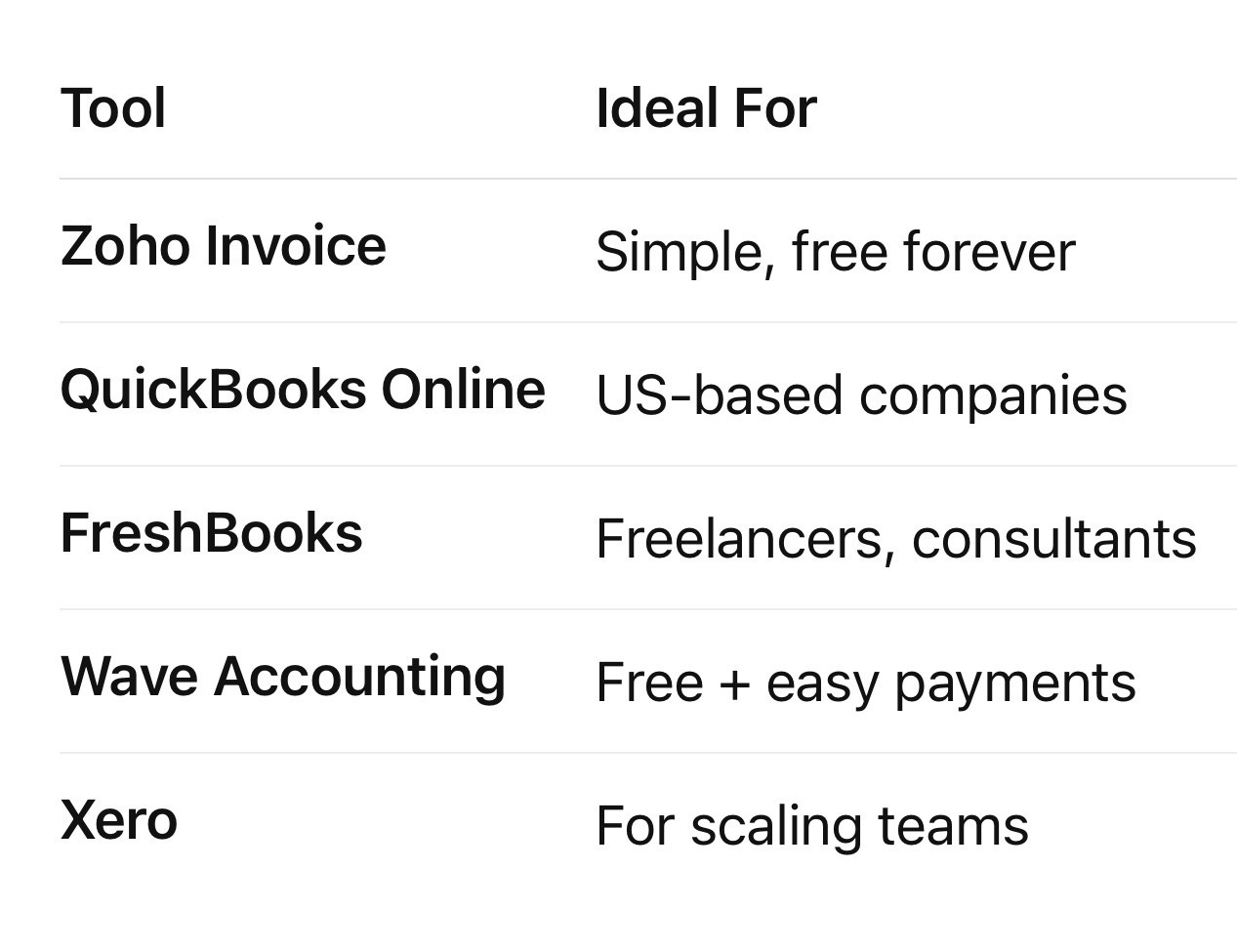
I personally use Zoho Invoice , it’s free, global, and perfect for multiple currencies.
You can send invoices directly from your company email, and once the client pays, the money flows into your company bank account. Congratulations 🥂 Now you’ve become a real business.
Step 6: From Solopreneur (S) → Small Team (S+)
As you grow, you’ll need people.
But remember: whether it’s one assistant, a developer, or an AI engineer -
they work for your company, not beside it.
Here’s what that means:
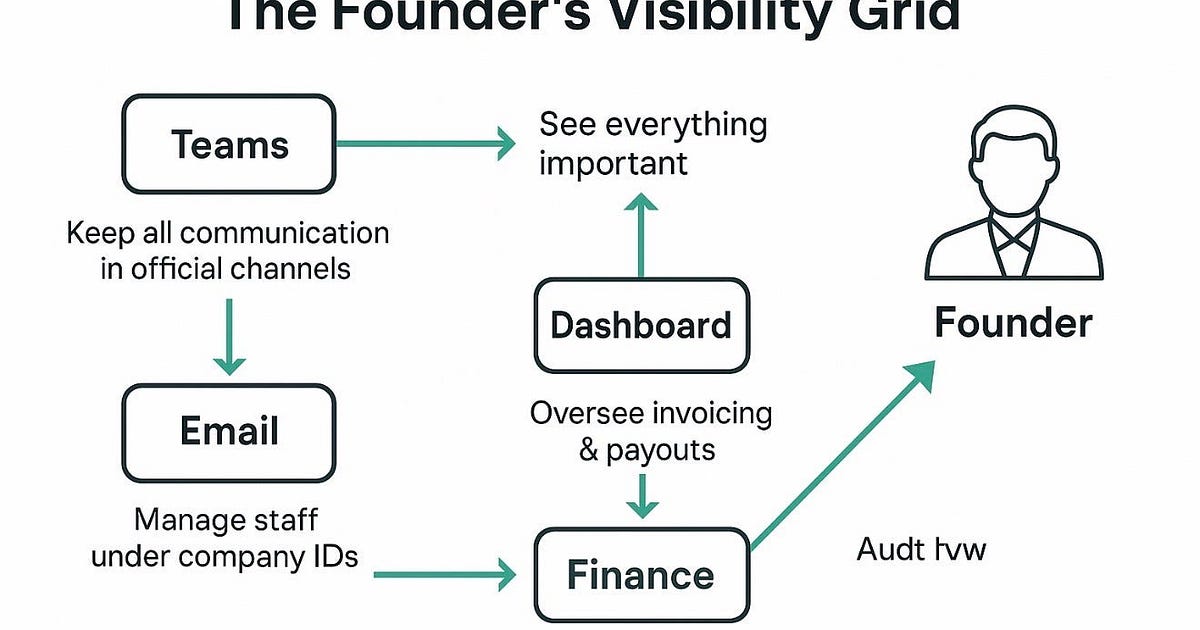
All communication through company emails (you control them)
All invoices sent from your company (not theirs)
All payments made to your company account first, and then you pay them from there
This keeps the business under your ownership while letting others contribute freely.
It’s your company, your client, your system.
That’s how you scale responsibly - without losing control.
Two Key Takeaways from Today
1️⃣ Set up your company email system - it’s your control panel.
2️⃣ Ensure all client payments come into your company bank account - it’s your foundation.
These two steps may look small, but they protect you from the biggest founder mistakes later , like team members going rogue or clients bypassing you.
💬 Need Help?
If you’re stuck setting up:
Microsoft 365 or Teams
Company email systems
Zoho invoicing
Drop a comment or message — I’ll help you out in my next post or chat or comment.
Also we will talk about How to Hire your next employees and which Payroll system and other system you should have in place to make sure you enjoy life while money flows in to your company bank account while you having the complete visibility of what’s going on ( Till the time you hire a Full Time CEO for your company 😊 - But even he should know you are the Boss with all control )
In the next few weeks for our Paid subscribers we’ll also go deeper into:
How to Set Up Microsoft Teams and Channels So All Communication Stays Under Your Control.
Small steps now → huge relief later.
Build smart from day one.
Catch Up on Previous Posts
If you’ve just joined, here’s what we’ve covered next in the Solopreneur → System Founder series:
1️⃣ Who Owns the Code in the Age of AI
2️⃣ How to Manage a Tech Team When You’re Not Technical
3️⃣ From Solopreneur → Micro-Team: How to Scale While Staying in Control
4️⃣ The Revenue Share Trap — Why Founders Lose Control in % Deals
5️⃣ Push vs Pull — The Founder’s Revenue System
6️⃣ How to Build an AI-Run Business Without Being an AI Engineer
Originally published on Substack