💡 Who Owns the Code in the Age of AI?
Protect your workflows, AI prompts, and automation chains !
Ever wondered — when companies like Airbnb or DoorDash build their platforms, what stops one of their engineers from just copying the code and launching their own version?
It’s a fair question — and one that’s even more interesting today, when we’re no longer just talking about code, but AI workflows, automation logic, and prompt intelligence.
Because in 2025, your product isn’t just software.
It’s a living ecosystem built on AI tools, APIs, and integrations that run across multiple platforms.
🔐 How Big Tech Protects Their Code
When Airbnb, DoorDash, or Shopify build software, it’s not sitting in one single code folder — it’s a highly segmented system made up of:
Frontend apps (what users see)
Backend microservices (the real business logic)
Cloud-hosted data and APIs
CI/CD pipelines for secure deployment
Every line of code runs through version control (GitHub or GitLab).
Developers can only access the piece they’re assigned to.
This is called Role-Based Access Control (RBAC) — a system that ensures no single individual ever holds the entire source of truth.
And even if someone leaves, their access can be revoked instantly.
The company retains full control — legally and technically.
🧾 The Legal Shield
Beyond infrastructure, Big Tech relies on legal frameworks:
NDAs (Non-Disclosure Agreements)
IP Assignment Clauses (ensuring all creations belong to the company)
Non-Compete Agreements
Strict confidentiality policies
In the US, these are not symbolic — they are enforceable under intellectual property and trade secret laws.
If someone misuses company code or data, it’s a career-ending legal event.
⚙️ But What Happens in the AI Era?
Now fast-forward to today’s startup world — where apps aren’t fully coded.
They’re assembled through AI platforms like:
Lovable – app creation without code
n8n – AI workflow automation
Supabase – backend and database
OpenAI – intelligence and reasoning
Stripe – billing and payments
These tools make it possible to launch in weeks instead of months.
But they also raise a new question:
“If my AI engineer or automation consultant leaves,
can they walk away with my entire product?”
🧩 The New Meaning of “Code”
In the AI era, your IP (intellectual property) is not a .py or .js file.
It’s the combination of how your system thinks and connects.
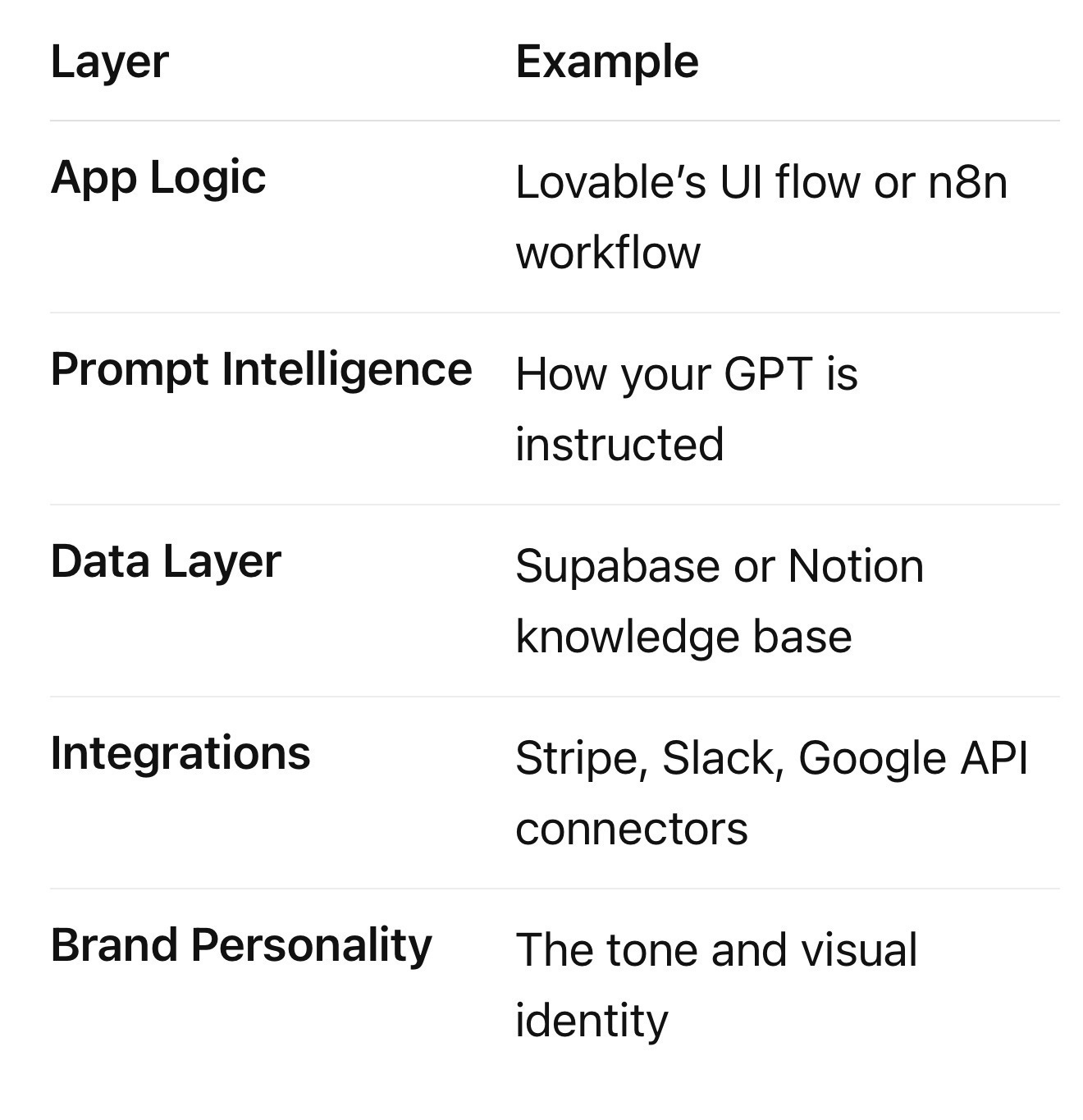
This means — your value lies not in lines of code, but in the orchestration of intelligence.
And that’s what needs protection.
🏗️ The New “Ownership Stack”
Here’s how US startups and digital businesses should plan their AI ownership and continuity strategy:
1. Company-Owned Accounts
Every AI tool you use — OpenAI, Lovable, Supabase, n8n, Stripe — should be owned by a company domain account (e.g., admin@yourcompany.com).
Never let freelancers or contractors set up accounts using their personal emails.
You can always add them as Editors or Collaborators — but keep ownership under your corporate domain.
⸻
2. Centralized Secrets Vault
Store all API keys, database credentials, and AI tokens in a secure vault such as:
• 1Password Business
• AWS Secrets Manager
• Bitwarden Teams
• Supabase Vault
Never expose keys inside scripts or workflows.
⸻
3. Version Control for No-Code
Even no-code tools can be backed up.
• Export Lovable projects
• Export n8n workflows as JSON
• Export Supabase schema + data seeds
• Store them in GitHub or Notion
This ensures that your team can rebuild or recover even if a platform or developer disappears.
⸻
4. Contractual IP Protection
Every contractor or AI consultant should sign:
• IP Ownership Clause: all workflows and configurations belong to your company.
• Tool Access Clause: all work must be done inside company-controlled accounts.
• Access Termination Clause: access will be revoked at project end.
Even small startups should treat this as standard — it’s the modern equivalent of signing an NDA in the coding era.
⸻
5. Document the System Blueprint
Create a private document or Notion page describing:
• What each tool does
• How they connect (Lovable → n8n → Supabase → OpenAI → Stripe)
• Who has access
• Backup and credential rotation plans
This single file is your digital continuity document — the “CTO handover” in case of emergencies.
⸻
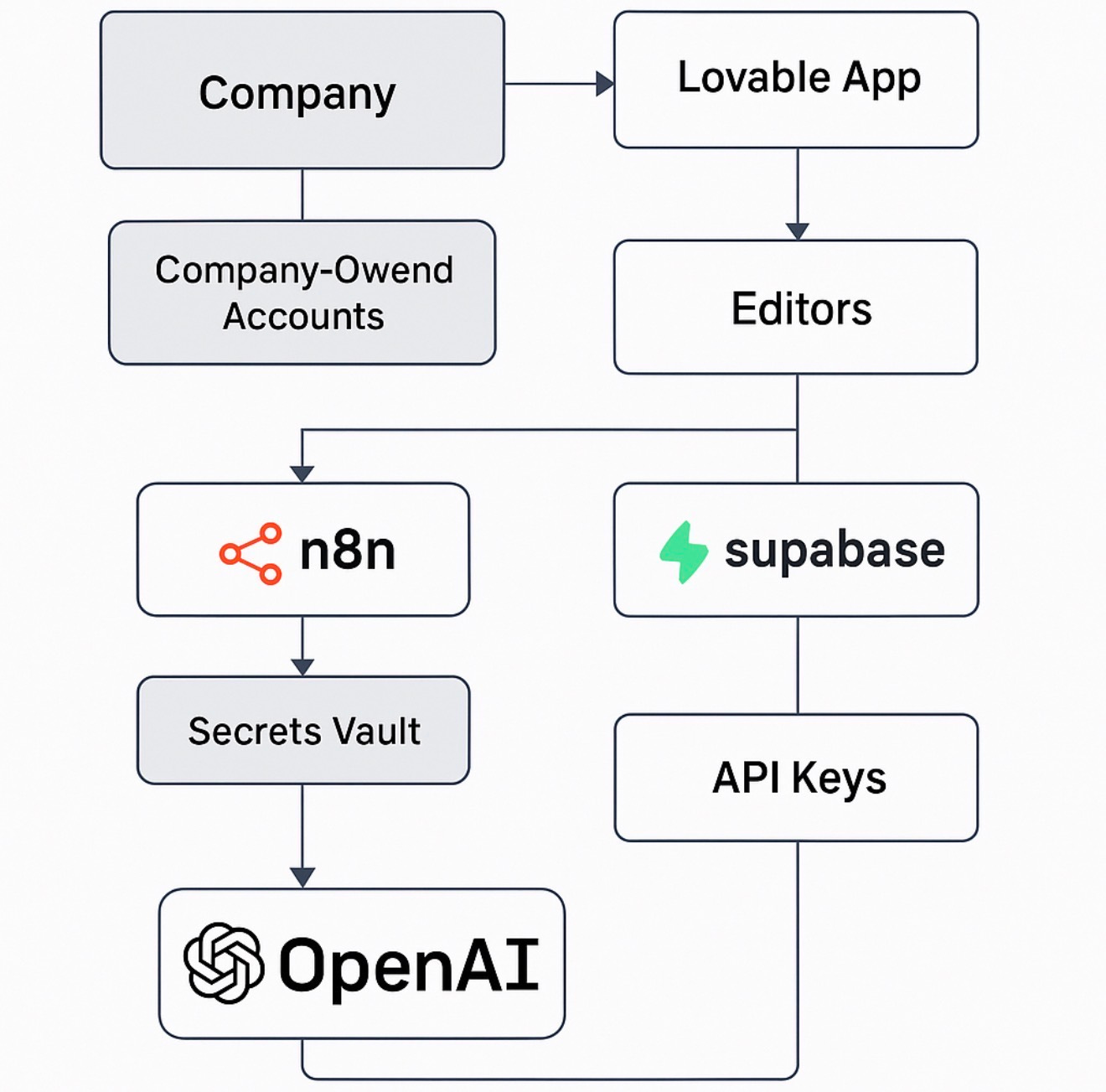
🧩 The Secure AI Stack — Visualized
Here’s what a secure AI stack looks like when structured for long-term ownership and continuity:
(insert your architecture diagram here)
This architecture shows how companies like yours can keep:
• Ownership centralized (company admin)
• Data secured (vaults and version control)
• Collaboration flexible (editor roles, not owner roles)
It’s how modern founders protect their “AI IP” in a distributed tool ecosystem.
⸻
The Big Idea
In the 2010s, companies protected code.
In the 2020s, companies must protect connections.
The workflows, AI prompts, and automation chains are your business now.
If you plan with ownership, documentation, and security in mind,
you’ll never have to fear losing your product — even if your CTO or AI developer walks out tomorrow.
⸻
Pro Tip for AI Founders
Create an internal “Admin Dashboard” - a page accessible only to you and your co-founders - listing all tool subscriptions, renewal dates, credentials, and contacts.
Think of it as your control room for AI operations.
⸻
Written by Akriti Lal - Founder, Instrovate Technologies | Microsoft Certified Trainer | AI Consultant
In today’s AI economy, control isn’t about how much code you write — it’s about how securely you design the system that writes it for you.
Originally published on Substack